How to Keep a Dividend Portfolio Tracker Accurate after Buying or Selling
A short maintenance routine helps your projected income remain useful after the portfolio changes.
A portfolio tracker is only as useful as the information it contains. Buying shares, selling a position, changing a dividend, or moving money between accounts can make an old income estimate misleading if the portfolio is not updated.
The good news is that maintenance does not have to mean rebuilding the portfolio every time. A repeatable review after each change is usually enough to keep the main totals and payment timing close to the current portfolio.
After buying shares
When you add to an existing position, review at least these values:
- Total shares owned
- Purchase price or cost basis
- Purchase date, if you use it for your records
- Dividend amount and payment schedule
Share count affects projected income directly. Cost basis affects gain and yield-on-cost calculations. A purchase can change one figure without changing the other, so it is worth checking both.
After selling shares
When you reduce or close a position, update the tracker promptly. Leaving the old share count in place can make projected income and portfolio value look higher than they really are.
If you sell a position entirely, remove it or replace the portfolio with a current positions import. If you track historical information elsewhere, keep that record separate from the active portfolio used for current income planning.
After a dividend change
Dividend amounts and schedules can change. A company may raise, reduce, suspend, or make an unusual distribution. When the saved dividend information no longer matches the latest information available to you, update the amount and timing in the tracker.
Use the estimate as a prompt to review the source information—not as proof that a future payment will occur. StockTracker is designed to organize the figures you save and show their effect on projected totals.
Use Find Dividend Info to speed up the review
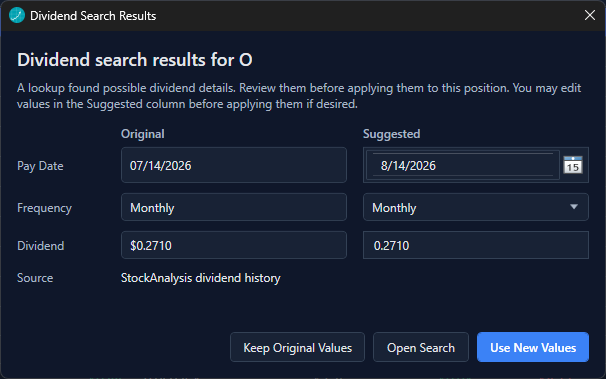
StockTracker includes a Find Dividend Info lookup for stock positions. Right-click a position in the portfolio and choose Find dividend info, or open the position editor and use the Find Dividend Info button.
The lookup can suggest dividend amounts, frequency, and payment details for review. Check the original and suggested values, then accept or edit the suggestion before applying it to the position. If a lookup does not find reliable information, enter or verify the details manually.
Refresh market data separately
Market prices and portfolio income details are related but separate. A quote refresh updates supported market data such as current price and daily movement. It does not replace reviewing share quantities, cost basis, or saved dividend schedules.
StockTracker supports Yahoo Quotes without an API key, Alpaca Markets with your own API key and secret, and CoinMarketCap for crypto quotes with an API key. Internet access is required when retrieving quotes.
A five-minute maintenance routine
- Update positions after trades.
- Check the total share count against the current brokerage position.
- Review purchase price and cost basis for changed positions.
- Review dividend amount, frequency, and estimated payment timing.
- Refresh market data when needed.
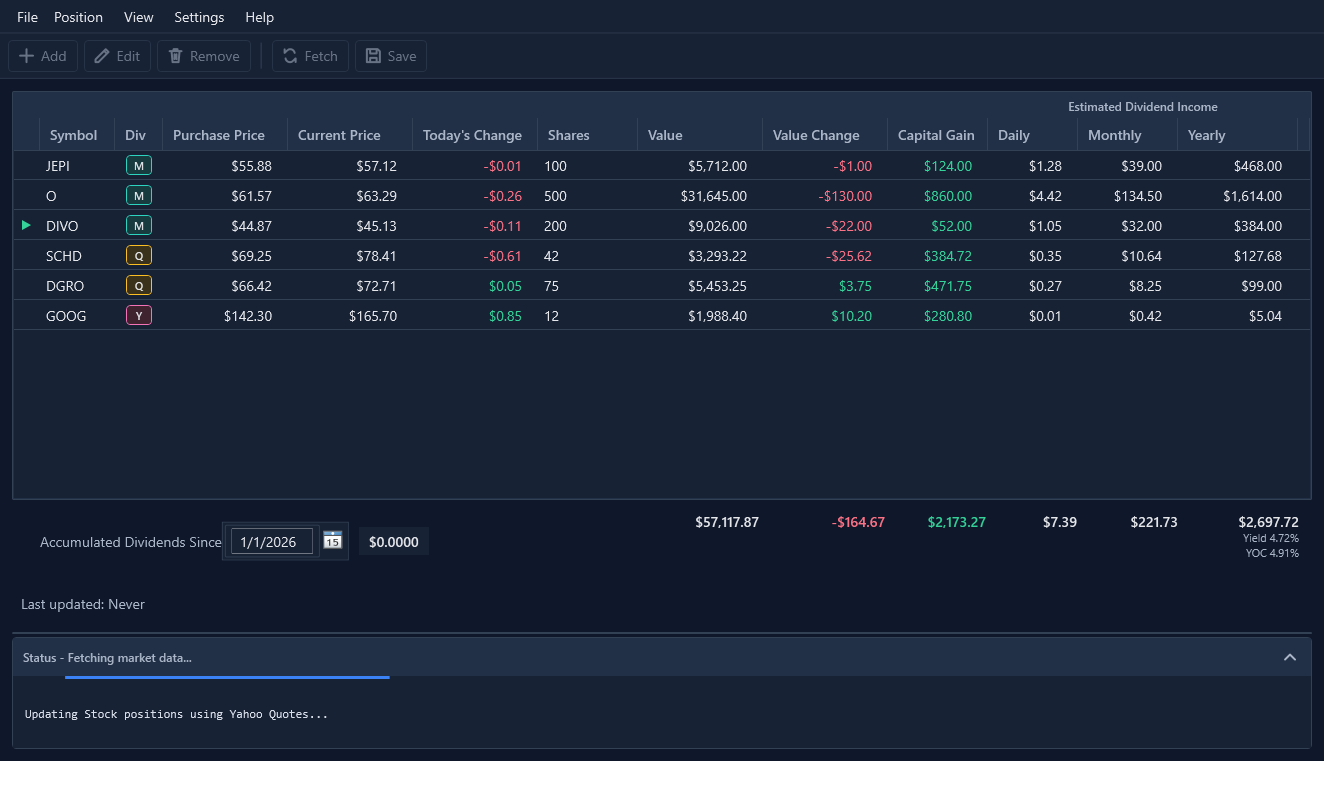
- Save the portfolio and scan the projected daily, monthly, and yearly totals.
Keep a backup of important portfolio files
StockTracker portfolio files are stored locally on your computer. That gives you control over the files, but it also means your normal backup habits matter. Keep a backup copy in a location you trust, especially before replacing a portfolio through an import.
Normal application updates and uninstalling preserve local activation data, but manually clearing application data can remove local settings and licensing information. Treat app-data cleanup as a deliberate maintenance action.
Make the review routine easy
StockTracker keeps income estimates, payment timing, values, and gains visible in one local Windows portfolio view.
Try StockTracker free Buy the full versionThe Windows installer is not currently code-signed. Read the installation guidance before opening it.